今年人生第一次到泰國旅遊
由於行前看非凡驚嘆號節目介紹得知
在泰國當地換泰幣非常方便,而且匯率比在台灣銀行換還優
所以打定主意到泰國親身體驗看看
不過由於形成的關係,第一天將從機場直接包車到華欣
今年人生第一次到泰國旅遊
由於行前看非凡驚嘆號節目介紹得知
在泰國當地換泰幣非常方便,而且匯率比在台灣銀行換還優
所以打定主意到泰國親身體驗看看
不過由於形成的關係,第一天將從機場直接包車到華欣
今年人生第一次到泰國旅遊
由於行前看非凡驚嘆號節目介紹得知
在泰國當地換泰幣非常方便,而且匯率比在台灣銀行換還優
所以打定主意到泰國親身體驗看看
不過由於形成的關係,第一天將從機場直接包車到華欣
轉自:http://ms-net.blogspot.tw/2012/11/the-solution-of-using-aspnet-create.html
問題:當在ASP.NET中使用Microsoft.Office.Interop.Excel之ApplicationClass來讀取Server上的Excel時,預設會出現以下的錯誤訊息:
Retrieving the COM class factory for component with CLSID {00024500-0000-0000-C000-000000000046} failed due to the following error: 80070005 存取被拒.
應用程式集區(AppPool)中只有.NET Framework 2.0可以選
但是明明有安裝新版本的Framework 卻在下拉選單看不到,只有
- Classic .NET AppPool
- DefaultAppPool
導致於執行網頁時候出現"無法辨認的屬性 targetFramework"
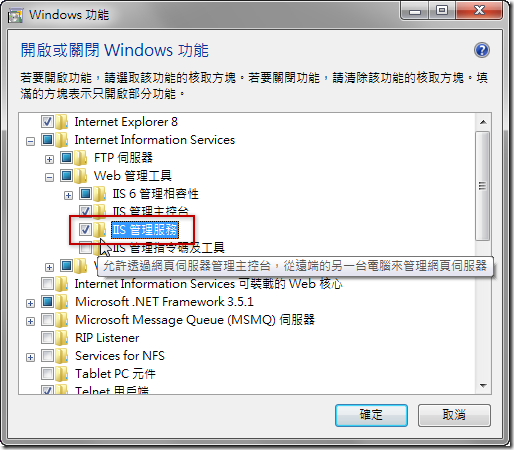
要從Visual Studio把ASP發佈到IIS上需要
1.IIS的 管理服務 開啟遠端連線
2.IIS Server上安裝 Web Deployment Tool (可從Web Platform Installer裝)
以下是說明 轉自保哥網站 http://blog.miniasp.com/post/2010/05/03/Deploying-Web-Application-Project-Using-One-Click-Publish.aspx
以往在部署網站的時候都有許多手動的步驟需介入,對於許多對 IIS / SQL 不太熟悉的新手來說部署網站變成一件非常困難且危險的事。這次 Visual Studio 2010 對於 ASP.NET 網站部署的能力大大的提升,它透過 Web Deploy API 直接與 IIS 溝通,可在發行的同時除了將網站安裝進 IIS 之外,還可以設定目錄權限、變更 web.config 內容、建立應用程式、應用程式集區、IIS 細部設定、安裝組件進 GAC、安裝憑證、設定機碼、建立資料庫、…. 等,非常強大的部署機制且與 IIS7 完美整合。
來源網址: http://abgne.tw/jquery/apply-jquery/jquery-scroll-to-page-top.html
$(function(){
	// 幫 a.abgne_gotoheader 加上 click 事件
	$('a.abgne_gotoheader').click(function(){
		// 讓捲軸用動畫的方式移動到 #header 的 top 位置
利用Calendar获取
view plain
Calendar c = Calendar.getInstance();
取得系统日期:year = c.get(Calendar.YEAR)
month = c.grt(Calendar.MONTH)